.png?width=5259&height=925&name=New%20logo%20color%20and%20v%20TM%20(color%20compliant).png "Dynamic Benchmarking Logo")

Easing Data Entry. Providing Instant Peer Insights.
StatChat turns complex data collection and report interpretation into a natural, conversational experience, helping your members upload responses in seconds and compare performance against aggregate industry peers effortlessly.
Key Capabilities at a Glance
- Supported File Formats: Spreadsheets & PDFs (.xlsx, .csv, .pdf)
- Interactive Conversational AI: Ask questions like "How does my organization compare on benefits?" or "Explain my percentile in health coverage."
- Privacy & Security: Powered by secure AI operating strictly on aggregate peer data.
Instant Automated Data Entry
- Upload Anything: Members attach spreadsheets or PDFs (.xlsx, .csv, .pdf) directly into the assistant.
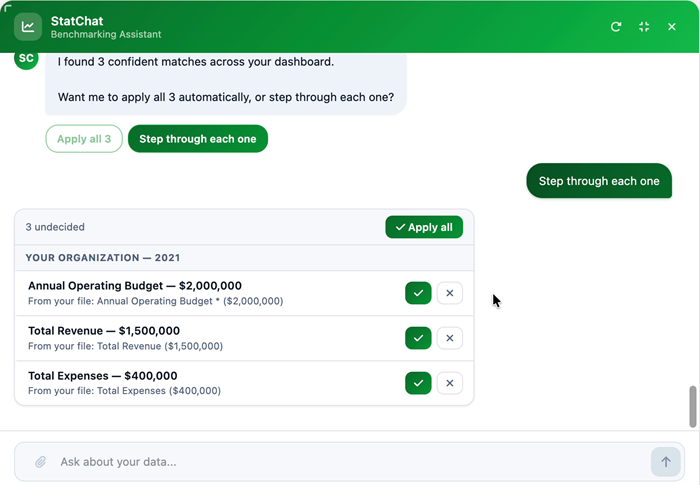
- Smart Mapping: StatChat automatically reads uploaded files and maps response values straight to your survey questions with high accuracy.
- Review & Save: Members review mapped answers (complete with confidence indicators) and save survey responses in just a couple of clicks.
StatChat generates a detailed comparison of the organization’s revenue against peer organizations, using
the uploaded and applied data.
Conversational Benchmarking & Analysis
- Instant Peer Comparisons: StatChat compares member-uploaded data directly against aggregate industry benchmark datasets.
- Deep Metric Explanations: Explains percentiles, interprets complex filtered results, and pinpoints exact organizational metrics on demand.
- Contextual Gap Analysis: Prompts members when key data is missing (e.g., retirement plans or health coverage) to complete their profile for deeper peer comparisons.
Can I add StatChat to my current Dynamic Benchmarking platform?
YES. StatChat AI operates as a stand-alone platform, equipped with its own servers and processing capabilities. Designed for versatility, it seamlessly unifies with any current Dynamic Benchmarking client database.

Ashley Geraghty
Director of Sales
Dynamic Benchmarking